

Context
Choose the active user and tenant for this browser profile. Lens adds them as request headers when the app calls its backend.
Tools
You’re testing an Arc app in the browser and you want to fire a command with a specific payload, or check what a query returns for a different tenant, without writing a throwaway page. Cratis Lens is a browser extension for exactly that: it detects the running Arc app in your current tab, lets you browse its commands and queries by namespace, run them with a structured form, and switch the active user and tenant on the fly.
Lens opens as a popup with five tabs. When the current tab is a running Arc application, Lens detects it and enables the command, query, and diagnostics tabs; on any other page only Context and Settings are available.
Context
Choose the active user and tenant for this browser profile. Lens adds them as request headers when the app calls its backend.
Commands
Browse the app’s commands by namespace and execute them with a schema-driven form; see the formatted result or validation errors.
Queries
Browse queries by namespace and perform them, with results shown in a table.
Query Diagnostics
Watch live observable-query health: transport, multiplexer, and cache state.
Settings
Manage users and tenants by hand, or sync them from the connected Arc app.
Lens is a Manifest V3 extension built with React, Vite, and PrimeReact. It
discovers the command and query catalog through the Arc backend’s
/.cratis/commands and /.cratis/queries endpoints.
When you switch user or tenant, Lens clears Arc’s .cratis-identity cookie for
the configured origins and reloads the matching tabs, so the next request is
authenticated as the person you picked. The tenant goes in the
x-cratis-tenant-id header, which is Arc’s default tenant header.
The Settings tab’s “sync from the connected Arc app” roster is not
configuration Lens invents on its own. It reads two endpoints every Arc
application exposes: GET /.cratis/tenants and GET /.cratis/users. A backend
answers them by implementing ICanProvideTenants and ICanProvideUsers in C#,
or the equivalent TenantsProvider/UsersProvider in Kotlin and Java. Multiple
providers can be registered at once; Arc merges their results. Without a
provider registered, both endpoints return an empty array, and Lens shows no
Arc-tagged entries until you add one or create a custom entry of your own.
When you open the Lens popup on a page it recognizes as a running Arc
application, it fetches both endpoints and merges the result into its own
roster (each entry tagged Arc). You can also add entries by hand from Lens
itself. Those are tagged Custom and survive even when the backend’s own list
changes or is temporarily unreachable.
The screenshots below are the real extension, popped open against demo data:
three users and two tenants, sourced from an Arc backend’s providers exactly
as /.cratis/users and /.cratis/tenants returned them.
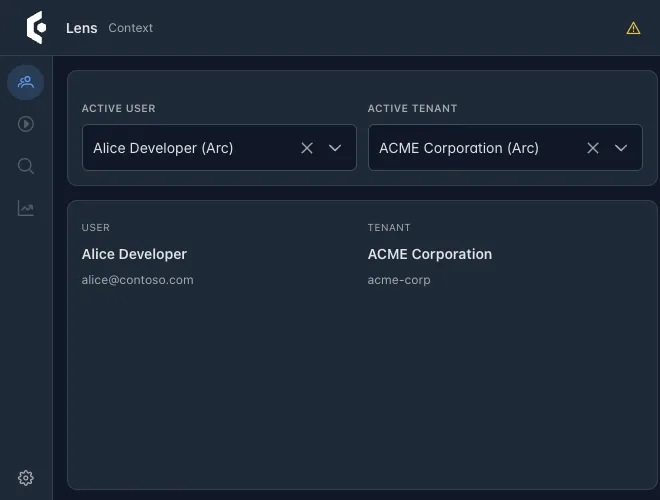
The Context tab is what you land on. It shows the currently active user and tenant for this browser profile, and lets you switch either one from a dropdown built from the merged roster. A switch takes effect immediately: every later request the inspected page makes carries the matching tenant header and identity headers, so the backend’s tenant resolution and identity provider see the switch as they would from a real caller.
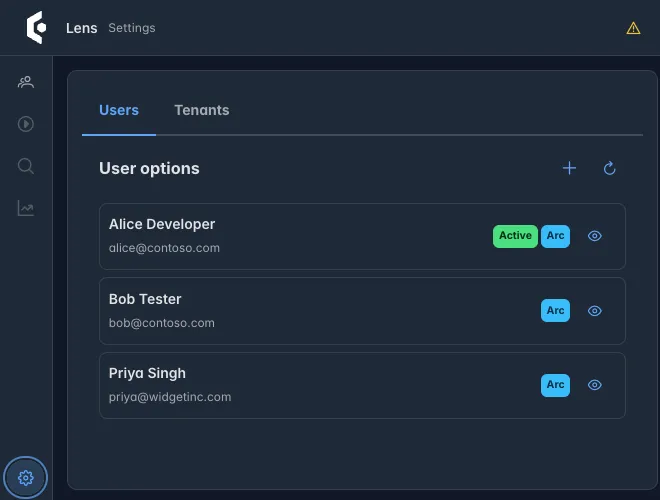
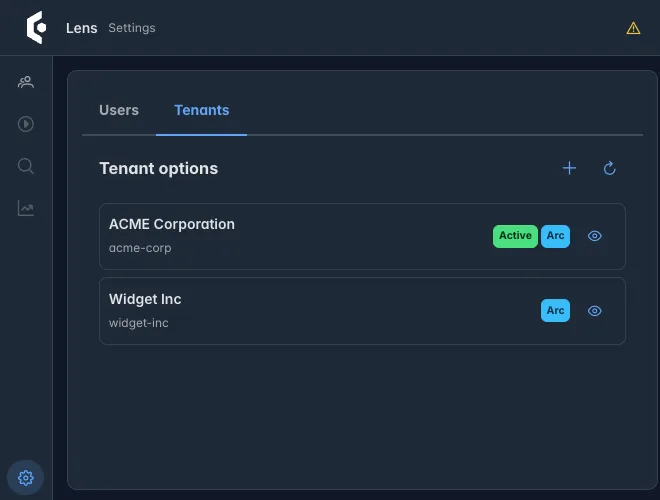
The Settings tab lists every known user and tenant, each with an Arc or
Custom badge so you can tell whether an entry came from the backend’s
providers or was added locally. The green Active badge marks the selection
currently in effect. Use the eye icon to inspect the full identity or tenant
payload the backend returned, the + to add a custom entry, and the refresh
icon to fetch again from the backend without reopening the popup.
See Development users and tenants (C#) or Development users and tenants (Kotlin and Java) for how to implement a provider, and Tenancy in Arc for how this discovery seam relates to actual tenant resolution at request time.
The easiest way to install Lens is from the Chrome Web Store. Click Add to Chrome and the extension is ready to use.
You can also build Lens from source and load it unpacked, which is useful for development or for trying unreleased changes. The source is at github.com/Cratis/Lens.
Clone the repo, then from the Source folder install and build:
cd Sourceyarn installyarn buildThis produces Source/dist/ (including manifest.json).
Open chrome://extensions, enable Developer mode, choose Load unpacked, and select the Source/dist folder. Lens appears as Cratis Lens.
Navigate to your running Arc app and open the Lens popup once so it detects the app. The Commands, Queries, and Query Diagnostics tabs become available.
For an active edit loop, run yarn dev to rebuild on change, and reload the extension from chrome://extensions after each rebuild.
What Lens is browsing: how Arc exposes queries and observable queries over your read models.
Provide tenants & users (C#)Implement ICanProvideTenants and ICanProvideUsers so Lens can discover and switch between them on your running app.
Implement TenantsProvider/UsersProvider, or the async Java variants, for the same discovery contract.
How this discovery seam relates to actual tenant resolution and isolation at request time.
VS Code extension (Narrator)The editor-side companion: explore the Chronicle event store from VS Code.