

Consuming pre-releases
All PRs that are marked as draft will have binary artifacts built for it so that one can test things out before the PR is accepted and merged in. The artifacts are not published to the production sources, as everything is built in debug mode and not considered ready for production. We leverage GitHub packages for these builds. You can find all the packages built on the Cratis GitHub packages page.
Whenever packages have been built, the build with add comments with links to the artifacts into the pull request:
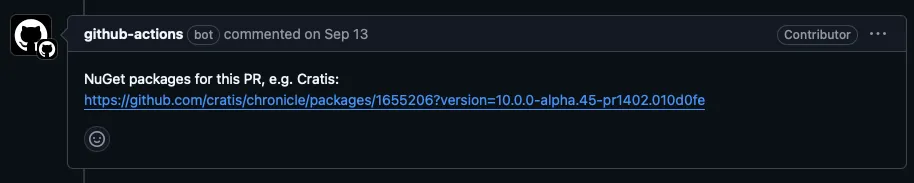
To consume the packages, you’ll need to configure the sources in your local repository.
Docker
Section titled “Docker”All Docker container images can be found in the Cratis container image registry.
For Docker there is no need to configure anything locally, all you need to do is change the image you’re using
from for instance cratis/chronicle:latest-development to the specific one @ GitHub, e.g. : ghcr.io/cratis/chronicle:6.11.6-pr537.adedc72.
All NuGet packages can be found in the Cratis NuGet packages feed.
To consume packages, you’ll need to configure either your global or local to your NuGet project. To start with you’ll need a GitHub personal access token, read the GitHub documentation on how this works.
NuGet supports having multiple sources, if you want to configure this globally available for all projects on your computer you can simply add a source using the dotnet CLI:
dotnet nuget add source --username USERNAME --password ${{ secrets.GITHUB_TOKEN }} --store-password-in-clear-text --name cratis "https://nuget.pkg.github.com/cratis/index.json"If you want to set it up locally for your repository, you can drop inn a NuGet.Config file into your repository configured with the username and token.
Note: The token is your personal access token, and if it is a read only token it is safe for other users to use. But if it has write access to anything, you should not share this token with anyone.
<?xml version="1.0" encoding="utf-8"?><configuration>    <packageSources>        <add key="ChroniclePreReleases" value="https://nuget.pkg.github.com/cratis/index.json" />    </packageSources>

    <packageSourceCredentials>        <ChroniclePreReleases>            <add key="Username" value="USERNAME" />            <add key="cleartextpassword" value="TOKEN" />        </ChroniclePreReleases>    </packageSourceCredentials></configuration>
Then all you need to do is use the correct version number for the package references you have.
For instance in your .csproj file(s):
<PackageReference Include="Cratis.Chronicle" Version="6.11.6-pr537.adedc72"/>For more details, read the GitHub documentation.