

Add Chronicle to a worker service
A worker service is the natural home for the reacting side of an event-sourced system: no web front end, just a long-running host that processes events, runs scheduled jobs, or keeps derived data up to date. Setup is mostly a matter of letting the generic host’s DI container do the wiring — register Chronicle once, then inject what you need wherever you need it.
We’ll build the same small library domain as the other host guides. If you’re building a web API instead, the ASP.NET Core guide covers that host; for the bare-bones, no-container version, see the console guide.
Before you start
Section titled “Before you start”Have the Chronicle kernel running locally. Run Chronicle locally brings it up with a single docker run and lists the prerequisites (.NET 8+, Docker); this guide assumes it’s listening on chronicle://localhost:35000.
Set up the project
Section titled “Set up the project”Create a folder for your project, then a .NET worker service inside it:
dotnet new workerAdd a reference to the Chronicle client package:
dotnet add package Cratis.ChronicleRegister Chronicle on the host
Section titled “Register Chronicle on the host”The generic host builds your app through IHostApplicationBuilder, which already has a dependency-injection container. One call hooks Chronicle into it and names the event store to use:
using Microsoft.Extensions.Hosting;
public static class GetStartedWorkerRegistration{    public static async Task ConfigureAndRun(string[] args)    {        var builder = Host.CreateApplicationBuilder(args);
        builder.AddCratisChronicle(options => options.EventStore = "Quickstart");        builder.Services.AddHostedService<GetStartedWorker>();
var host = builder.Build(); await host.RunAsync(); }}/** * The starter doesn't care whether the application serves HTTP or just runs in the background - * the same autoconfiguration connects, discovers every artifact in this application's packages, * and registers them with the kernel. After the application is ready, it waits up to * `cratis.chronicle.registration-timeout` (30 seconds by default) for the first registration pass, * then continues with a warning if needed. A web server may already accept requests at that point; * the first append waits separately for that pass. The entry point needs nothing Chronicle-specific - * only Spring Boot's own `@SpringBootApplication` class and `runApplication<...>(*args)`. Point * it at an event store with one setting in application.yml: * * ```yaml * cratis: * chronicle: * event-store: Quickstart * ``` */object GetStartedWorkerRegistration/** * The starter doesn't care whether the application serves HTTP or just runs in the background - * the same autoconfiguration connects, discovers every artifact in this application's packages, * and registers them with the kernel. After the application is ready, it waits up to * {@code cratis.chronicle.registration-timeout} (30 seconds by default) for the first registration * pass, then continues with a warning if needed. A web server may already accept requests; * the first append waits separately for that pass. The entry point needs nothing Chronicle-specific - * only Spring Boot's own {@code @SpringBootApplication} class and * {@code SpringApplication.run(...)}. Point it at an event store with one setting in * application.yml: * * <pre> * cratis: * chronicle: * event-store: Quickstart * </pre> */class GetStartedWorkerRegistration {}Elixir does not support this workflow yet.TypeScript does not support this workflow yet.Like the ASP.NET Core host, AddCratisChronicle registers Chronicle’s services — IEventStore, IEventLog, IReactors, IReducers, IProjections — and automatically discovers and registers your artifacts (reactors, reducers, projections) from the loaded assemblies. It reads its connection settings from the Cratis:Chronicle section of appsettings.json:
{ "Cratis": { "Chronicle": { "ConnectionString": "chronicle://localhost:35000", "EventStore": "Quickstart" } }}Define some events
Section titled “Define some events”Everything in Chronicle starts with a fact. You model facts as record types marked with [EventType] — records because an event, once it happened, never changes. The attribute is how Chronicle discovers the type; it takes no name, the type name is the identity.
Here are the facts of a small library — a book arrives, gets borrowed, and comes back:
using Cratis.Chronicle.Events;
[EventType]public record GetStartedBookAdded(string Title, string Isbn);
[EventType]public record GetStartedBookBorrowed(string MemberName);
[EventType]public record GetStartedBookReturned;import io.cratis.chronicle.events.EventType
@EventTypedata class GetStartedBookAdded(val title: String, val isbn: String)
@EventTypedata class GetStartedBookBorrowed(val memberName: String)
@EventTypeclass GetStartedBookReturnedimport io.cratis.chronicle.events.EventType;
@EventTyperecord GetStartedBookAdded(String title, String isbn) {}
@EventTyperecord GetStartedBookBorrowed(String memberName) {}
@EventTyperecord GetStartedBookReturned() {}defmodule MyApp.Events.GetStartedBookAdded do use Chronicle.Events.EventType, id: "get-started-book-added"
defstruct [:title, :isbn]end
defmodule MyApp.Events.GetStartedBookBorrowed do use Chronicle.Events.EventType, id: "get-started-book-borrowed"
defstruct [:member_name]end
defmodule MyApp.Events.GetStartedBookReturned do use Chronicle.Events.EventType, id: "get-started-book-returned"
defstruct []endimport { eventType } from '@cratis/chronicle';import { field } from '@cratis/fundamentals';
@eventType()class GetStartedBookAdded { @field(String) title: string; @field(String) isbn: string;
constructor(title: string, isbn: string) { this.title = title; this.isbn = isbn; }}
@eventType()class GetStartedBookBorrowed { @field(String) memberName: string; constructor(memberName: string) { this.memberName = memberName; }}
@eventType()class GetStartedBookReturned {}BookReturned carries no data at all — that it happened, on a particular book’s stream, is the whole story. Not every fact needs a payload.
Append them
Section titled “Append them”You record a fact by appending it to an event sequence. Chronicle gives you one by default — the event log, the main sequence you’ll use, much like the main branch of a Git repository. Reach it through the event store:
using Cratis.Chronicle;
public class GetStartedBookService(IEventStore eventStore){    public async Task<Guid> AddBook()    {        var eventLog = eventStore.EventLog;
        var bookId = Guid.NewGuid();        await eventLog.Append(bookId, new GetStartedBookAdded("The Pragmatic Programmer", "978-0135957059"));
return bookId; }}import io.cratis.chronicle.IEventStoreimport java.util.UUID
class GetStartedBookService(private val eventStore: IEventStore) { suspend fun addBook(): String { val eventLog = eventStore.eventLog
val bookId = UUID.randomUUID().toString() eventLog.append(bookId, GetStartedBookAdded("The Pragmatic Programmer", "978-0135957059"))
return bookId }}import io.cratis.chronicle.IEventStore;import io.cratis.chronicle.java.BlockingEventStore;import java.util.UUID;
class GetStartedBookService { private final BlockingEventStore eventStore;
GetStartedBookService(IEventStore eventStore) { this.eventStore = new BlockingEventStore(eventStore); }
String addBook() { var bookId = UUID.randomUUID().toString();
eventStore.getEventLog().append( bookId, new GetStartedBookAdded("The Pragmatic Programmer", "978-0135957059"));
return bookId; }}defmodule MyApp.BookService do alias MyApp.Events.GetStartedBookAdded
def add_book do book_id = Base.encode16(:crypto.strong_rand_bytes(8), case: :lower)
:ok = Chronicle.append(book_id, %GetStartedBookAdded{ title: "The Pragmatic Programmer", isbn: "978-0135957059" })
book_id endendimport { IEventStore } from '@cratis/chronicle';
class GetStartedBookService { constructor(private readonly store: IEventStore) {}
async addBook(bookId: string): Promise<void> { const eventLog = this.store.eventLog;
await eventLog.append(bookId, new GetStartedBookAdded('The Pragmatic Programmer', '978-0135957059')); }}That first argument is the event source id — the identity of the thing this fact is about, like a primary key. Every event you append against bookId becomes part of that book’s stream of history.
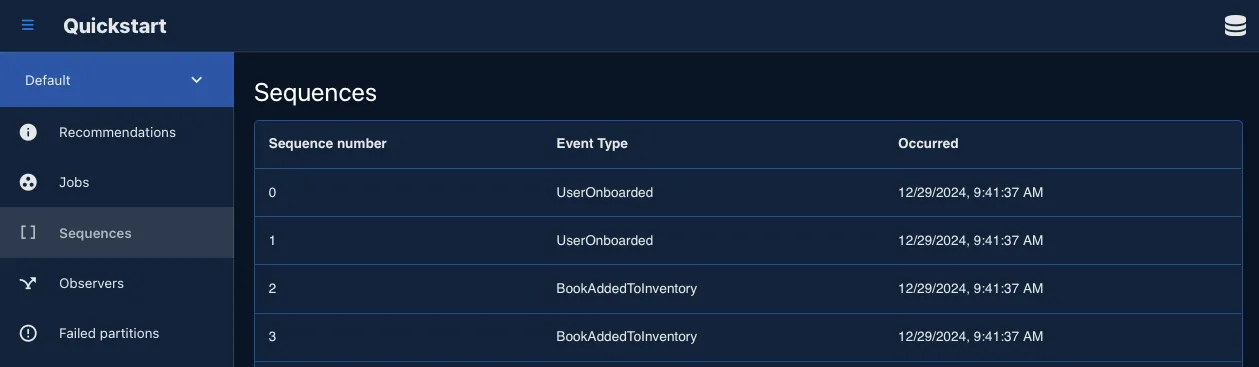
Run your app, then open the workbench, pick your event store, and select Sequences — your GetStartedBookAdded is sitting there, permanent and in order. In a fresh event store the first event is at sequence number 0.
Turn events into a read model
Section titled “Turn events into a read model”Events are the write side — the source of truth. To read current state you don’t query the log directly; you let Chronicle fold the events into a read model for you. The declarative way to do that is a projection: you declare the shape you want and which events feed each field, and Chronicle keeps it in sync — no update code, ever.
using Cratis.Chronicle.Keys;using Cratis.Chronicle.Projections.ModelBound;
[FromEvent<GetStartedBookAdded>]public record GetStartedBook(    [Key]    Guid Id,
    string Title,
    string Isbn,
    [SetValue<GetStartedBookAdded>(false)]    [SetValue<GetStartedBookBorrowed>(true)]    [SetValue<GetStartedBookReturned>(false)]    bool OnLoan,
[SetFrom<GetStartedBookBorrowed>(nameof(GetStartedBookBorrowed.MemberName))] string? BorrowedBy);Kotlin does not support this workflow yet.Java does not support this workflow yet.defmodule MyApp.ReadModels.GetStartedBook do use Chronicle.ReadModels.ReadModel
defstruct id: "", title: "", isbn: "", on_loan: false, borrowed_by: ""
from MyApp.Events.GetStartedBookAdded, set: [id: :event_source_id, title: :title, isbn: :isbn, on_loan: false]
from MyApp.Events.GetStartedBookBorrowed, set: [on_loan: true, borrowed_by: :member_name]
from MyApp.Events.GetStartedBookReturned, set: [on_loan: false]endimport { fromEvent, Guid, setFrom, setValue } from '@cratis/chronicle';import { field } from '@cratis/fundamentals';
@fromEvent(GetStartedBookAdded)export class GetStartedBook { id: Guid = Guid.empty;
@setFrom(GetStartedBookAdded, 'title') title = '';
@setFrom(GetStartedBookAdded, 'isbn') isbn = '';
@setValue(GetStartedBookAdded, false) @setValue(GetStartedBookBorrowed, true) @setValue(GetStartedBookReturned, false) onLoan = false;
@setFrom(GetStartedBookBorrowed, 'memberName') @field(String) borrowedBy: string | null = null;}Read the attributes as a sentence: a book comes into the view from BookAdded; OnLoan is false when it’s added, true when borrowed, false again when returned; BorrowedBy is whoever borrowed it. You’re declaring how facts map onto the view — Chronicle replays the events in order and applies the mapping.
One view rarely answers every question. The librarian’s next one is “what’s out on loan right now?” — and rather than filtering GetStartedBook, you declare a second, purpose-built read model whose very existence tracks the loan:
using Cratis.Chronicle.Keys;using Cratis.Chronicle.Projections.ModelBound;
[FromEvent<GetStartedBookBorrowed>][RemovedWith<GetStartedBookReturned>]public record GetStartedBorrowedBook(    [Key]    Guid Id,
string MemberName);import io.cratis.chronicle.projections.FromEventimport io.cratis.chronicle.projections.RemovedWithimport io.cratis.chronicle.readModels.ReadModel
@ReadModel@FromEvent(GetStartedBookBorrowed::class)@RemovedWith(GetStartedBookReturned::class)data class GetStartedBorrowedBook( val id: String = "", val memberName: String = "")import io.cratis.chronicle.projections.FromEvent;import io.cratis.chronicle.projections.RemovedWith;import io.cratis.chronicle.readModels.ReadModel;
@ReadModel@FromEvent(eventType = GetStartedBookBorrowed.class)@RemovedWith(eventType = GetStartedBookReturned.class)class GetStartedBorrowedBook { private String id = ""; private String memberName = "";
public GetStartedBorrowedBook() {}
public String getId() { return id; } public void setId(String id) { this.id = id; }
public String getMemberName() { return memberName; } public void setMemberName(String memberName) { this.memberName = memberName; }}defmodule MyApp.ReadModels.GetStartedBorrowedBook do use Chronicle.ReadModels.ReadModel
defstruct id: "", member_name: ""
from MyApp.Events.GetStartedBookBorrowed, set: [id: :event_source_id, member_name: :member_name]
removed_with MyApp.Events.GetStartedBookReturned, []endimport { fromEvent, Guid, removedWith, setFrom } from '@cratis/chronicle';
@fromEvent(GetStartedBookBorrowed)@removedWith(GetStartedBookReturned)export class GetStartedBorrowedBook { id: Guid = Guid.empty;
@setFrom(GetStartedBookBorrowed, 'memberName') memberName = '';}The moment a GetStartedBookBorrowed lands, a GetStartedBorrowedBook instance appears — keyed by the book’s id, its MemberName mapped by the same naming convention. When the matching GetStartedBookReturned arrives, [RemovedWith<GetStartedBookReturned>] removes the instance from the view again. The collection always holds exactly the books that are out right now — no flag to maintain, no filter to remember, no cleanup job. Kotlin and Java don’t currently have an equivalent to [RemovedWith<T>].
Query the read models
Section titled “Query the read models”The most direct way to look at a read model is to ask Chronicle itself. IReadModels — reached through eventStore.ReadModels — hands you every instance of a read model, one call per view:
using Cratis.Chronicle;
public class GetStartedBookQueryService(IEventStore eventStore){    public async Task<(IEnumerable<GetStartedBook> Books, IEnumerable<GetStartedBorrowedBook> BorrowedBooks)> QueryBooks()    {        var books = await eventStore.ReadModels.GetInstances<GetStartedBook>();        var borrowedBooks = await eventStore.ReadModels.GetInstances<GetStartedBorrowedBook>();
return (books, borrowedBooks); }}Kotlin does not support this workflow yet.Java does not support this workflow yet.defmodule MyApp.BookQueryService do alias MyApp.ReadModels.GetStartedBook alias MyApp.ReadModels.GetStartedBorrowedBook
def query_books do {:ok, books} = Chronicle.all(GetStartedBook) {:ok, borrowed_books} = Chronicle.all(GetStartedBorrowedBook)
{books, borrowed_books} endendimport { IEventStore } from '@cratis/chronicle';
class GetStartedBookQueryService { constructor(private readonly store: IEventStore) {}
async queryBooks(): Promise<{ books: GetStartedBook[]; borrowedBooks: GetStartedBorrowedBook[] }> { const books = await this.store.readModels.getInstances(GetStartedBook); const borrowedBooks = await this.store.readModels.getInstances(GetStartedBorrowedBook);
return { books, borrowedBooks }; }}These instances come from the sink. By default Chronicle materializes every projection into the sink storage configured for the event store — MongoDB unless you change it. For the default namespace the database is named after the event store (Quickstart), and each collection after its read model, pluralized: GetStartedBooks and GetStartedBorrowedBooks. That makes a query cheap — a database fetch, whatever the length of the history.
Materialization happens in the background as events arrive, so these reads are eventually consistent. An append completes when the event is in the log, not when the read model has caught up, so a query issued straight after an append can miss it. That is most noticeable on the first event against a fresh event store: processing that event also creates the projection pipeline and its storage for the first time, so the read straight after that append is the one most likely to come back empty. Query again a moment later and the book is there.
When a read has to include the event you just appended, you have two tools. Mark the read model passive, and Chronicle keeps it out of the sink and computes it from its events on every read. Or keep it materialized and wait for the append’s observers to catch up before reading. Read model consistency compares the two.
Getting a collection of instances covers the details, including the event count you can pass to replay a read model from the beginning instead. Kotlin and Java currently only support fetching a single instance by key (getInstanceByKey) — fetching every instance of a read model isn’t available yet.
GetInstances returns every stored instance at once. The Materialized API reads the same stored instances back a page at a time. Kotlin and Java don’t currently have a materialized/paging query API at all; Elixir’s equivalent pages by page number rather than skip/take:
using Cratis.Chronicle;
public class GetStartedBookPagingService(IEventStore eventStore){ public async Task<IEnumerable<GetStartedBook>> GetPage() => await eventStore.ReadModels.Materialized.GetInstances<GetStartedBook>(skip: 0, take: 20);}Kotlin does not support this workflow yet.Java does not support this workflow yet.defmodule MyApp.BookPagingService do alias MyApp.ReadModels.GetStartedBook
def get_page do {:ok, result} = Chronicle.ReadModels.query(GetStartedBook, page: 0, page_size: 20) result.instances endendimport { IEventStore } from '@cratis/chronicle';
class GetStartedBookPagingService { constructor(private readonly store: IEventStore) {}
getPage(): Promise<GetStartedBook[]> { return this.store.readModels.materialized.getInstances(GetStartedBook, 0, 20); }}skip and take are plain paging (they default to 0 and 50), so you can window through a large collection without ever loading all of it — Materialized read models shows the paging and observing patterns.
Neither call filters, though: GetInstances returns everything (you’d filter with LINQ in memory), and Materialized only pages. When you need to filter efficiently — “which books are on loan?” — query the sink’s database directly with its native tools. Our sink is MongoDB, so GetStartedBooks is an ordinary collection that your language’s MongoDB driver can query (the Chronicle client does not bring one in; add it to your project):
using MongoDB.Driver;
public class GetStartedBooks(IMongoCollection<GetStartedBook> collection){ public IEnumerable<GetStartedBook> OnLoan() => collection.Find(b => b.OnLoan).ToList();}import io.cratis.chronicle.IEventStoreimport io.cratis.chronicle.readModels.ReadModel
@ReadModeldata class GetStartedBook(val title: String = "", val onLoan: Boolean = false)
/** * Kotlin has no raw MongoCollection to query directly - reads go through the read model service * instead, which returns already-deserialized instances to filter in memory. */class GetStartedBooks(private val store: IEventStore) { suspend fun onLoan(): List<GetStartedBook> = store.readModels.getInstances(GetStartedBook::class).filter { it.onLoan }}import io.cratis.chronicle.IEventStore;import io.cratis.chronicle.java.ReadModelsJavaBridge;import io.cratis.chronicle.readModels.ReadModel;
import java.util.List;import java.util.stream.Collectors;
@ReadModelrecord GetStartedBook(String title, boolean onLoan) {}
// Java has no raw MongoCollection to query directly - reads go through the read model service// instead, which returns already-deserialized instances to filter in memory.class GetStartedBooks { private final IEventStore store;
GetStartedBooks(IEventStore store) { this.store = store; }
List<GetStartedBook> onLoan() { return ReadModelsJavaBridge.getInstances(store.getReadModels(), GetStartedBook.class).stream() .filter(GetStartedBook::onLoan) .collect(Collectors.toList()); }}Elixir does not support this workflow yet.TypeScript does not support this workflow yet.Append a GetStartedBookBorrowed against the same bookId, query again, and OnLoan is true with BorrowedBy set — and a GetStartedBorrowedBook now sits in its collection. Append a GetStartedBookReturned and both flip back: the flag clears, the GetStartedBorrowedBook disappears. You never wrote an UPDATE. The trade-offs between the on-demand and materialized paths are laid out in read model consistency.
React when something happens
Section titled “React when something happens”Projections build state. When you need to do something the moment a fact lands — notify someone, call another system — you write a reactor. IReactor is a marker; you just add a method whose first parameter is the event you care about, and Chronicle routes matching events to it:
using Cratis.Chronicle.Events;using Cratis.Chronicle.Reactors;
public class GetStartedBookReturnedNotifier : IReactor{ public Task Returned(GetStartedBookReturned @event, EventContext context) { // context.EventSourceId is the BookId this happened to Console.WriteLine($"Book {context.EventSourceId} was returned — notify the next member in line."); return Task.CompletedTask; }}import io.cratis.chronicle.events.EventContextimport io.cratis.chronicle.observation.Reactor
@Reactorclass GetStartedBookReturnedNotifier { fun returned(event: GetStartedBookReturned, context: EventContext) { // context.eventSourceId is the bookId this happened to println("Book ${context.eventSourceId} was returned — notify the next member in line.") }}import io.cratis.chronicle.events.EventContext;import io.cratis.chronicle.observation.Reactor;
@Reactorclass GetStartedBookReturnedNotifier { void returned(GetStartedBookReturned event, EventContext context) { // context.getEventSourceId() is the bookId this happened to System.out.println("Book " + context.getEventSourceId() + " was returned — notify the next member in line."); }}defmodule MyApp.Reactors.GetStartedBookReturnedNotifier do use Chronicle.Reactors.Reactor
alias MyApp.Events.GetStartedBookReturned
@handles GetStartedBookReturned
@impl true def handle(%GetStartedBookReturned{}, %{event_source_id: book_id}) do # book_id is the id this happened to IO.puts("Book #{book_id} was returned — notify the next member in line.") :ok endendimport { EventContext, onceOnly, reactor } from '@cratis/chronicle';
@reactor()class GetStartedBookReturnedNotifier { // Method name must be the exact camelCase of the event's class name - // Chronicle discovers handlers by name, not by parameter type. @onceOnly() async getStartedBookReturned(event: GetStartedBookReturned, context: EventContext): Promise<void> { // context.eventSourceId is the bookId this happened to console.log(`Book ${context.eventSourceId} was returned — notify the next member in line.`); }}No registration, no wiring — drop the class in and every GetStartedBookReturned flows to it. Reactors must be idempotent, because the same event may be delivered more than once (during a replay or a recovery). Delivery identity explains what Chronicle does and does not guarantee there. In a real app you’d inject a notification service here — the tutorial and the Reactors guide show that, along with how reactors get their dependencies under a host.
That’s the whole loop — append → project → react. The tutorial builds exactly this library one concept at a time and explains each as you go; the Projections, Reducers, and Reactors guides go deeper on each piece.
Append from the worker
Section titled “Append from the worker”In a worker you append from your BackgroundService rather than inline. Inject IEventStore (or IEventLog directly) and append inside ExecuteAsync:
using Cratis.Chronicle;using Microsoft.Extensions.Hosting;
public class GetStartedWorker(IEventStore eventStore) : BackgroundService{    protected override async Task ExecuteAsync(CancellationToken stoppingToken)    {        await eventStore.Connection.Connect();
        var bookId = Guid.NewGuid();        await eventStore.EventLog.Append(bookId, new GetStartedBookAdded("The Pragmatic Programmer", "978-0135957059"));
// Keep running so reactors and projections keep processing. await Task.Delay(Timeout.Infinite, stoppingToken); }}import io.cratis.chronicle.IEventStoreimport kotlinx.coroutines.runBlockingimport java.util.UUID
/** * A Spring `CommandLineRunner` bean (`@Component class X(...) : CommandLineRunner`) is the plain * Spring Boot way to do work at startup in a host with no web layer. Reactors and projections are * already running in the background once the starter has registered them - the function below is * what that runner's `run` method calls to append the first event. */fun seedFirstBook(eventStore: IEventStore) = runBlocking { val bookId = UUID.randomUUID().toString() eventStore.eventLog.append(bookId, GetStartedBookAdded("The Pragmatic Programmer", "978-0135957059"))}import io.cratis.chronicle.IEventStore;import io.cratis.chronicle.java.BlockingEventStore;
import java.util.UUID;
// A Spring CommandLineRunner bean (@Component class X implements CommandLineRunner) is the plain// Spring Boot way to do work at startup in a host with no web layer. Reactors and projections are// already running in the background once the starter has registered them - this method is what// that runner's run() calls to append the first event.class GetStartedWorker { private final BlockingEventStore eventStore;
GetStartedWorker(IEventStore eventStore) { this.eventStore = new BlockingEventStore(eventStore); }
void run() { String bookId = UUID.randomUUID().toString(); eventStore.getEventLog().append(bookId, new GetStartedBookAdded("The Pragmatic Programmer", "978-0135957059")); }}defmodule MyApp.GetStartedWorker do @moduledoc """ Appends a book-added event once `Chronicle.Client` is running as part of the application's supervision tree.
Reactors and projections keep processing events in the background for as long as the supervision tree stays up — there is no separate "keep running forever" loop to write here, unlike a .NET `BackgroundService`. """
alias MyApp.Events.GetStartedBookAdded
def add_book do book_id = Base.encode16(:crypto.strong_rand_bytes(8), case: :lower)
Chronicle.append(book_id, %GetStartedBookAdded{ title: "The Pragmatic Programmer", isbn: "978-0135957059" }) endendTypeScript does not support this workflow yet.The projections and the GetStartedBookReturnedNotifier reactor pick those events up from the kernel — the worker stays alive to keep processing them.
Configure the MongoDB client
Section titled “Configure the MongoDB client”The GetStartedBooks query reads documents Chronicle wrote, so the MongoDB driver needs to match how Chronicle stores them — register these conventions once at startup:
MongoDB
Section titled “MongoDB”When you read Chronicle’s read models with the MongoDB driver, the driver has to expect the documents Chronicle writes. Three things matter:
- Chronicle adds metadata fields of its own, such as
__subject, so the driver must ignore elements your type does not declare. - Identifiers such as a
Guidkey are stored as standard UUIDs. - Element names match your property names exactly as declared, and each collection is named after its read model, pluralized. Chronicle only writes camel-case names if you opt into its camel case naming policy; match the driver to whichever policy you chose, or queries match nothing without reporting an error.
using MongoDB.Bson;using MongoDB.Bson.Serialization;using MongoDB.Bson.Serialization.Conventions;using MongoDB.Bson.Serialization.Serializers;
public static class GetStartedMongoDbDefaults{    public static void Configure()    {        BsonSerializer            .RegisterSerializer(new GuidSerializer(GuidRepresentation.Standard));
        var pack = new ConventionPack        {            // Chronicle adds its own metadata fields to every document, such as __subject.            new IgnoreExtraElementsConvention(true)
// Element names match your C# property names by default. Add a // CamelCaseElementNameConvention here only if you configured Chronicle // with the camel case naming policy. }; ConventionRegistry.Register("conventions", pack, t => true); }}/** * Kotlin has nothing to configure here. Chronicle stores event source ids as standard UUIDs and * read model fields as camelCase names - which already match Kotlin property names - and reads * go through `IEventStore.readModels` rather than a raw MongoDB driver, so there is no * `MongoClientSettings`, GUID representation, or "ignore unknown elements" convention to * register. Unknown document fields are simply not deserialized into properties the read model * class does not declare. */object GetStartedMongoDbDefaults// Java has nothing to configure here. Chronicle stores event source ids as standard UUIDs and// read model fields as camelCase names - which already match Java property names - and reads go// through IEventStore.getReadModels() rather than a raw MongoDB driver, so there is no// MongoClientSettings, GUID representation, or "ignore unknown elements" convention to register.// Unknown document fields are simply not deserialized into properties the read model class does// not declare.class GetStartedMongoDbDefaults {}Elixir does not support this workflow yet.TypeScript does not support this workflow yet.Then register the database and the collection so a type can take an IMongoCollection<GetStartedBook> dependency:
using Microsoft.Extensions.DependencyInjection;using Microsoft.Extensions.Hosting;using MongoDB.Driver;
public static class GetStartedWorkerMongoRegistration{ public static void ConfigureServices(IHostApplicationBuilder builder) { builder.Services.AddSingleton<IMongoClient>(new MongoClient("mongodb://localhost:27017")); builder.Services.AddSingleton(provider => provider.GetRequiredService<IMongoClient>().GetDatabase("Quickstart")); builder.Services.AddTransient(provider => provider.GetRequiredService<IMongoDatabase>().GetCollection<GetStartedBook>("GetStartedBooks")); }}/** * Kotlin needs no separate MongoDB registration step here either - the same * `IEventStore.readModels` API used by the ASP.NET Core host works identically in a background * worker. There is no raw `MongoCollection` to construct or register as a bean. See * `get-started/common/mongo-query` for the equivalent query. */object GetStartedWorkerMongoRegistration// Java needs no separate MongoDB registration step here either - the same// IEventStore.getReadModels() API used by the ASP.NET Core host works identically in a// background worker. There is no raw MongoCollection to construct or register as a bean. See// get-started/common/mongo-query for the equivalent query.class GetStartedWorkerMongoRegistration {}Elixir does not support this workflow yet.TypeScript does not support this workflow yet.Register your artifacts
Section titled “Register your artifacts”Chronicle creates its discovered artifacts — reactors, reducers, projections — through the container. If an artifact is registered as a service, Chronicle uses that registration; otherwise it constructs the artifact itself and resolves its constructor parameters from the container. So you never have to register the reactor, but you do have to register what it depends on, such as the notification service a real waitlist reactor would take. As the solution grows, let Cratis Fundamentals register those services by convention:
using Cratis.DependencyInjection;using Microsoft.Extensions.DependencyInjection;using Microsoft.Extensions.Hosting;
public static class GetStartedWorkerConventionRegistration{ public static void ConfigureServices(IHostApplicationBuilder builder) { builder.Services .AddBindingsByConvention() .AddSelfBindings(); }}/** * Spring's own convention is `@ComponentScan`: every class carrying a recognized stereotype in * the scanned packages becomes a registered bean automatically - the same mechanism that finds * Chronicle artifacts. `@SpringBootApplication` already implies scanning its own package and * below, so this is only needed to widen the scan to another package explicitly, by adding * `@ComponentScan("io.cratis.chronicle.samples.getstarted")` to an `@Configuration` class. */object GetStartedWorkerConventionRegistration// Spring's own convention is @ComponentScan: every class carrying a recognized stereotype in the// scanned packages becomes a registered bean automatically - the same mechanism that finds// Chronicle artifacts. @SpringBootApplication already implies scanning its own package and// below, so this is only needed to widen the scan to another package explicitly, by adding// @ComponentScan("io.cratis.chronicle.samples.getstarted") to an @Configuration class.class GetStartedWorkerConventionRegistration {}Elixir does not support this workflow yet.TypeScript does not support this workflow yet.AddBindingsByConvention registers any service that implements an interface of the same name prefixed with I (IFoo → Foo); AddSelfBindings registers concrete classes as themselves.
Going further
Section titled “Going further”- Multi-tenant namespaces — provide a custom
IEventStoreNamespaceResolverto route operations per tenant. See Namespace resolution. - Structural dependencies — supply custom identity providers, correlation-id accessors, or namespace resolvers through the
configurecallback onAddCratisChronicle. See Structural dependencies.
You added Chronicle to a worker service with a single AddCratisChronicle call, pointed it at an event store through appsettings.json, and appended events from a BackgroundService — the generic host’s DI container discovered your reactors, reducers, and projections and handed you the services to use them. The same library domain runs here unchanged from the other hosts.
Where to go next
Section titled “Where to go next”- Build the domain step by step — the tutorial walks the library model one concept at a time.
- Reacting to events — a worker’s main job; see Reactors for the patterns.
- A different host — the same artifacts run unchanged behind a web API (ASP.NET Core) or with no container at all (console).